
Binance KYC: How Identity Verification Works
Binance requires KYC before you trade. Learn the documents you need, how the face check works, how long review takes, and how to fix rejections.
 Lucas Almeida 5 min read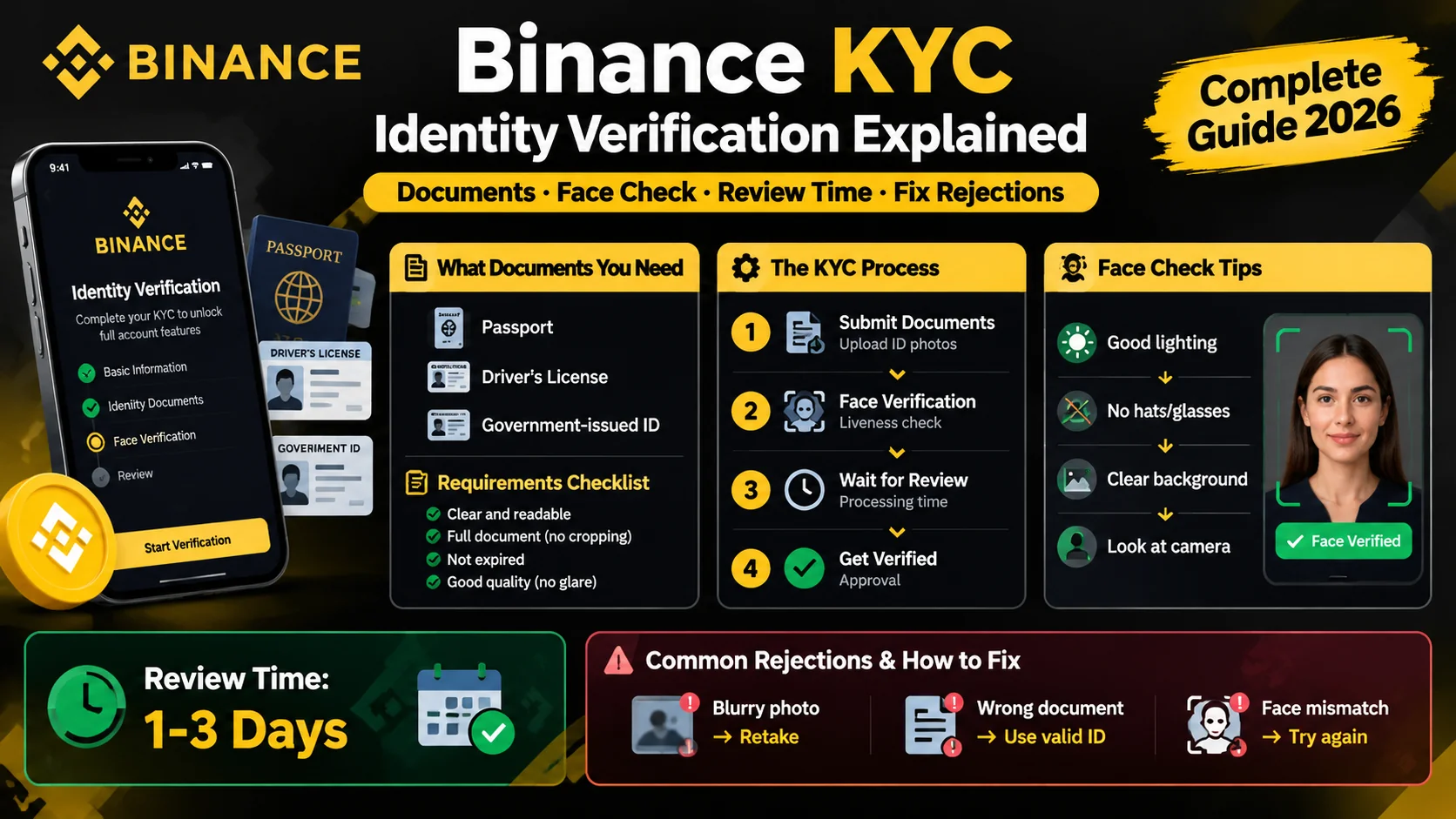
Key takeaways
- KYC ("know your customer") is the identity check Binance is required to run by law — it is not optional, and unverified accounts cannot deposit, trade, or withdraw.
- You need one government-issued ID (passport, national ID, or driver's license), a camera for the face check, and details that match your ID exactly.
- Most verifications are approved within minutes, but review can take up to 48 hours during busy periods.
- Binance has two levels — Verified (basic) and Verified Plus (advanced) — with higher limits and features at the higher level.
- Keep your ID flat, well-lit, and glare-free; a blurry or cropped photo is the most common reason for rejection.
Binance KYC — “know your customer” — is the identity verification you must complete before you can deposit, trade, or withdraw. You upload a government-issued ID, do a short face check, and wait for approval, which usually takes minutes. It is required by law, not an optional step.
This guide explains exactly what KYC is, what you need, how to pass it on the first try, and what to do if it is rejected.
What is KYC and why does Binance require it?
KYC is the process of proving you are a real, identified person. Binance runs it because regulators require exchanges to know who is using their platform.
The purpose is to prevent money laundering, fraud, and the financing of illegal activity. Every major exchange — not just Binance — is subject to these rules in the countries where it operates.
In practice, KYC means Binance checks three things:
- Who you are — a government-issued ID such as a passport, national ID, or driver’s license.
- That it is really you — a live face-verification check that matches your face to the ID photo.
- Where you live — your country of residence, and at higher levels, proof of address.
Until this check passes, your account is limited. Binance places unverified accounts in “withdrawal-only” mode (per Binance’s identity verification FAQ), which means no new deposits, no trading, and no new withdrawals beyond closing existing positions.
What you need before you start
Gather these before you begin so the flow is not interrupted:
- A government-issued ID — passport, national ID card, or driver’s license, as listed in Binance’s verification FAQ. It must be valid and not expired.
- A camera — your phone or computer webcam, for photographing the ID and doing the face check.
- Good lighting — a bright, even light source with no glare on the ID.
- Matching details — the name and date of birth you registered with must match your ID exactly.
Which document should you use? Any of the three works, but they differ slightly in how easy they are to photograph.
| Document | Notes |
|---|---|
| Passport | Usually the easiest — a single page with all the details, accepted everywhere |
| National ID card | Has front and back sides to photograph; accepted in most regions |
| Driver’s license | Also front and back; accepted in some regions, so check yours is listed |
Use whichever document you have that is valid and unexpired. The name on it must match the name on your account exactly, down to the spelling.
You do not need a printer or a scanner; a clear phone photo of the ID is fine.
Binance KYC levels: Verified vs. Verified Plus
Binance splits verification into two levels. Which one you need depends on how much you plan to use the platform.
| Verified (basic) | Verified Plus (advanced) | |
|---|---|---|
| What is checked | ID document + face check | ID + face check + proof of address and additional questions |
| Unlocks | Standard deposits, spot trading, withdrawals | Higher withdrawal and fiat limits, more features |
| Who needs it | Most retail users | Users moving larger amounts or using fiat services |
To give you a sense of the difference, one Binance source published these indicative monthly fiat limits (figures vary by region and change over time, so read them as a rough guide, not a promise):
| Level | Fiat deposits (monthly) | Fiat withdrawals (monthly) |
|---|---|---|
| Verified | ~5,000 USD | ~10,000 USD |
| Verified Plus | ~15,000 USD | ~30,000 USD |
The important point: Binance does not publish one universal limit, because the number depends on your country, your verification level, and sometimes the local Binance entity. The authoritative figure is shown on your account’s Identification page, so check there after each level is approved rather than trusting a table from memory (Binance’s verification FAQ confirms limits vary by region and are not published as one number).
Start with basic verification; you can upgrade later if you hit a limit.
How to complete Binance KYC step by step
The flow takes a few minutes. Here is how it goes in order.
Step 1: Open the verification page
Log in to Binance and open your account or profile menu. Tap Identification or Get Verified. The screen shows your current level and what you still need to do.
Step 2: Select your country and document type
Choose your country of residence, the country that issued your document, and the document type — passport, national ID, or driver’s license. Pick the one that matches the physical ID you have in front of you.
Step 3: Upload your ID
Photograph or scan the front and back of your ID. Keep it flat, well-lit, and fully inside the frame. The four corners of the document should be visible, with no glare hiding the photo, name, or expiry date.
Step 4: Complete the face verification
Follow the prompts for the liveness check. It asks you to look into the camera and sometimes to blink or turn your head slightly, to prove you are a live person rather than a photo of one.
Remove hats and glasses, and stand in even light. The check usually takes under a minute.
Step 5: Confirm your personal information
Review your name, date of birth, and other details. They must match your ID exactly. Once you confirm, you cannot change them without going through verification again, so check carefully.
Step 6: Wait for review
Submit and wait. Most verifications are approved within minutes. If yours is pending, check the Identification page for the current status — you will see Verified once it is approved.
How long does Binance KYC take?
Most people are verified within minutes. Binance states a typical review window of up to 48 hours, and heavy traffic or a document problem can push it longer.
If you are still pending after 48 hours, check whether you missed a step — for example, a blurry photo or a name mismatch — rather than waiting indefinitely. The status page in your account is the source of truth.
Here is roughly what to expect at each stage:
| Status | What it means |
|---|---|
| Pending | Your submission is in the queue — normal for the first few hours |
| Under review | A reviewer or automated check is looking at your documents |
| Action required | Something failed — usually a photo or name issue; fix it and resubmit |
| Verified | Approved — deposits, trading, and withdrawals are now open |
The exact labels on the screen can differ, but the pattern is the same: “action required” is the one that needs your input, and the rest just take time.
Why KYC gets rejected (and how to fix it)
Rejection is almost always about the photo, not about you. The most common causes, and the fix for each:
| Reason | What went wrong | The fix |
|---|---|---|
| Blurry or cropped photo | The ID is not sharp or corners are cut off | Retake in good light, show all four corners |
| Glare or shadow | Light reflects off the ID and hides details | Move the light source, or take the photo at an angle |
| Expired document | The ID is out of date | Use a current, valid document |
| Name mismatch | Registered name does not match the ID | Check the spelling and resubmit with the correct details |
| Face check failure | Bad lighting, hat, glasses, or too much movement | Remove hat and glasses, use even light, hold still |
Fix the specific issue and resubmit. Binance allows multiple attempts, so a single rejection is not a problem — but double-check the details rather than retrying blindly.
Is KYC safe? What Binance does with your data
A common worry is handing over your ID to an exchange. Two things help put this in perspective.
First, KYC is standard across regulated financial services — banks run the same kind of check when you open an account. You are not being singled out.
Second, Binance is subject to data-protection laws in the jurisdictions it operates in, and it publishes privacy policies covering how identity documents are stored and used. That does not mean “no risk ever” — no company is immune to a breach — but the alternative, an exchange with no KYC at all, carries far greater legal and fraud risk.
For the strongest control over your own data and funds, larger holdings belong in a self-custody wallet, where only you hold the keys. See our wallets and security guides.
The bottom line
Binance KYC is a required, usually quick step: upload a government-issued ID, complete a short face check, and wait a few minutes for approval. Prepare a valid, well-lit ID that matches your registered name, and you will almost always pass on the first try. Until it is approved, you cannot deposit, trade, or withdraw — so complete it right after creating your account.
💡 Don't have a Binance account yet? Sign up now — enter the referral code BN2688.
Once you are verified, the next step is depositing funds into Binance.
Don't have a Binance account yet?Sign up nowenter the referral codeBN2688
Frequently asked questions
Is Binance KYC mandatory?
What documents do I need for Binance KYC?
How long does Binance KYC take?
Why was my Binance KYC rejected?
What is the difference between Verified and Verified Plus?
Can I use someone else's ID for Binance KYC?
Editor-in-Chief & Lead Researcher
Editor of MyCryptoStart. Independent researcher of cryptocurrency exchanges, focused on fees, security, KYC, and onboarding — publishes step-by-step guides in plain English for beginners.
View author page →Some links on this page are affiliate links: we may earn a commission at no extra cost to you. This content is educational and is not financial, investment, or legal advice. Affiliate disclosure · Disclaimer.
Continue reading
Binance P2P: Buy and Sell Crypto Peer-to-Peer
How Binance P2P works — buy and sell crypto directly with other users, with zero fees and an escrow system that holds funds until payment is confirmed.
How to Create a Binance Account (2026 Guide)
Create a Binance account in about five minutes: sign up with email or phone, verify KYC, and turn on 2FA. Step-by-step guide for beginners.
Binance Fees Explained: What You'll Pay
A plain-English breakdown of Binance fees — the 0.1% spot fee, 25% BNB discount, free crypto deposits, and withdrawal costs.